GPU Communications - I
In this blog, I’ll cover GPU communication concepts, from page tables to IPC handles to NVLink and connect each to how SGLang uses them internally. This will be a multi part blog series and thus some of the concepts discussed here will be covered in depth later, like VMM and symmetric memory.

Contents
- Basics
- Mem sharing on CPU
- Mem sharing on GPU
- Physical Transport: PCIe, NVLink and NVSwitch
- Closing Thoughts
Basics
The address of every page of a tensor is stored in a lookup table called Page Table. Each of these physical addresses (PA) has a hexadecimal key called the virtual address (VA) which is used to dereference it. This table is managed privately by the OS/driver and we can’t modify it manually. It is also important to note that this table contains the addresses to individual pages (typically 4 KB for CPUs and 2 MB for GPUs) and not the entire blob.
In CPUs the PA is carved out lazily on first touch, while in GPUs it is committed right on the spot. This act of allocating PA is privileged (only the kernel/driver is allowed to write page table rows), on CPUs it is done via mmap() and on GPUs it is done via cudaMalloc(). In practice we don’t want to make these expensive syscall everytime and thus the user space code (which has unprivileged bookkeeping access) takes already allocated VA->PA rows and hands pieces of it to the program for reuse. On CPU it is glibc malloc and on GPU it is Torch’s CUDACachingAllocator.
Pinned vs pageable host memory
A page (VA) we get from malloc is pageable and the OS is free to move it to a different frame (physical page-sized slot) at any moment. It can be due to mem swapping, NUMA balancing or something else. The VA stays the same, only the PA is updated in the page table. When we are working with GPU, especially when doing host->device copy, the GPU’s copy engine (dedicated hardware block) pulls the bytes over PCIe using DMA. DMA or Direct Memory Access, as the name suggests, directly accesses the physical frames in RAM and if these addresses are changed on the fly GPU can end up reading garbage.
To solve this we use Pinned Memory. Pinned or page-locked memory is the host memory which won’t be moved by the OS and its PA remains fixed. The CUDA driver maps these pages into the GPU’s address space and thus this one physical page gets rows in two page tables. Pageable copies still work but with one extra step, the data is first copied into a pinned staging buffer and then DMAed from there. Pinning is generally used for objects in the hot path, where fast access throughput outweighs the one time pinning cost.
NUMA placement
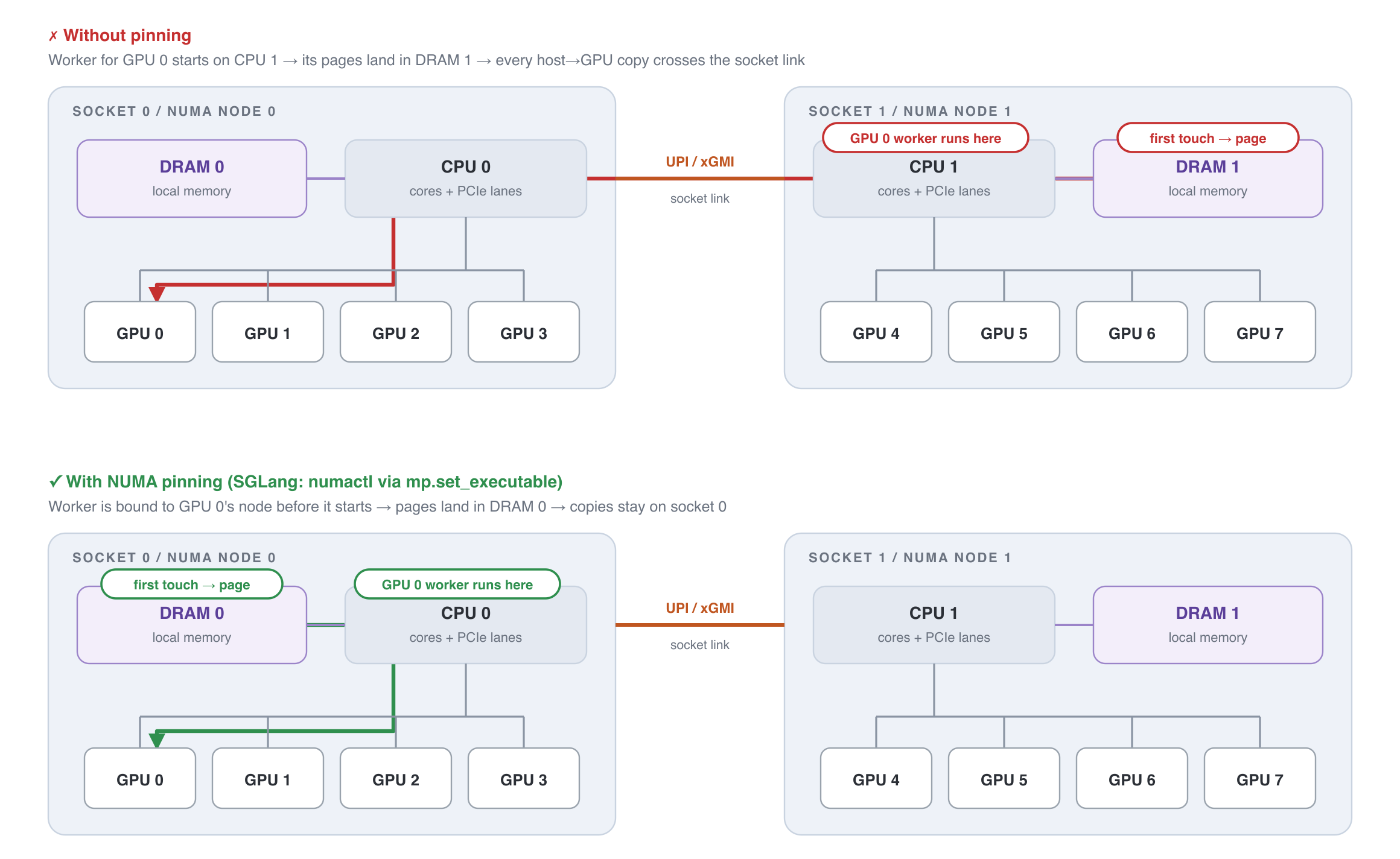
On systems with multi CPU, each of them have their own DRAM with their own PCIe lanes. A socket together with its local DRAM is called a NUMA node (Non uniform memory access node). On a 8-GPU system with 2 CPUs (like HGX 8-GPU server), half of the GPUs are connected to socket 0 and the other half to socket 1. CPUs can still read each other’s socket’s memory but the traffic goes over the inter socket link. For Intel it is UPI (Ultra Path Interconnect) and for AMD it’s xGMI.
Since malloc only hands out a VA initially, the actual NUMA node is selected when it assigns the physical page / frame. The default policy for this assignment is “first touch”, the page gets placed on the node of the core that ran the process. If the process starts on a different node, it would end up paying the inter socket overhead for every load and store (since its GPU data is on the other node) and thus proper process ‘pinning’ becomes important. To make sure the process is pinned properly right from the birth SGLang uses a clever trick. Python’s multiprocessing library exposes a set_executable method for changing the launch program. SGLang passes a custom few-line script in this that basically adds the NUMA pinning even before the process runs.
Mem sharing on CPU
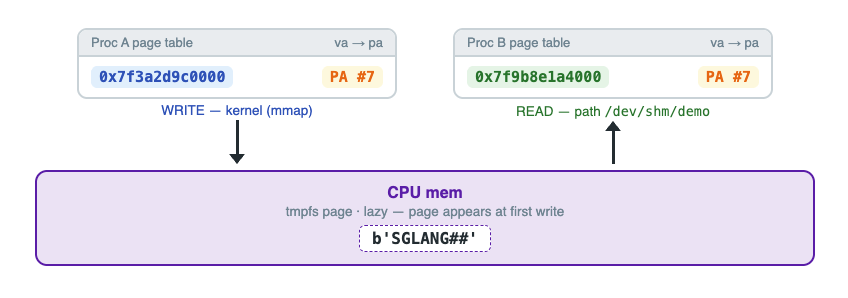
Let’s see with a simple example how this can be done on the CPU side. We will have two different processes access the same physical address with different VAs. /dev/shm (tmpfs) is a filesystem whose files live purely in the page cache (instead of it being flushed to the disk later on).
import ctypes
import mmap
import multiprocessing as mp
import os

# Linux: /dev/shm (tmpfs). macOS: /tmp (no /dev/shm on darwin).
PATH = "/dev/shm/sglang_demo" if os.path.exists("/dev/shm") else "/tmp/sglang_demo"

def va(buf):
    # address of the mapping in THIS process's address space
    return hex(ctypes.addressof(ctypes.c_char.from_buffer(buf)))

def child(path):
    fd = os.open(path, os.O_RDWR)          # open the same file
    buf = mmap.mmap(fd, 4096)              # kernel maps it -> gets its OWN VA
    print(f"[child  pid={os.getpid()}]  VA={va(buf)}  reads:  {buf[0:8]}")
    buf[8:16] = b"THANKS!!"                # write back through its own VA
    buf.close()

if __name__ == "__main__":
    if os.path.exists(PATH):
        os.unlink(PATH)
    fd = os.open(PATH, os.O_CREAT | os.O_RDWR, 0o600)
    os.ftruncate(fd, 4096)
    buf = mmap.mmap(fd, 4096)

    print(f"[parent pid={os.getpid()}]  VA={va(buf)}  writes: b'SGLANG##'")
    buf[0:8] = b"SGLANG##"                 # first touch happens here

    p = mp.Process(target=child, args=(PATH,))
    p.start()
    p.join()

    print(f"[parent pid={os.getpid()}]  reads child's write through its own VA: {buf[8:16]}")
    buf.close()
    os.unlink(PATH)
The above gives us the following output
[parent pid=79900]  VA=0x1011f0000  writes: b'SGLANG##'
[child  pid=79902]  VA=0x100638000  reads:  b'SGLANG##'
[parent pid=79900]  reads child's write through its own VA: b'THANKS!!'
SGLang Usage
Many fast paths only work if all ranks are on the same machine, like custom-all-reduce (we’ll cover this later). SGLang uses this same /dev/shm trick to find if the ranks are in one machine. It simply creates dummy segment in memory and broadcasts its name to all the ranks. The ranks simply try to open it, those which can’t are not on the same node / don’t have access to the same RAM.
Another usage of this is in pointer sharing. In multimodal models, when doing parallel processing (TP, DP etc..), sending the entire tensor payload over to all the ranks can be expensive as their tokenized inputs are much larger than text tokens. To minimize the transfer cost, SGLang simply puts the tensor in shared memory and shares its handle (~100 bytes) with the other ranks. Each process mmaps it and gets a VA pointing to the same physical address.
Mem sharing on GPU
The CPU demo was quite straightforward and it worked because of three things:
- Shared Namespace: Both the processes knew the file location and could find the file, thus the PA we are trying to share.
- A row writer: We didn’t modify the table ourselves but used mmap() to insert VA->PA mappings. If we simply read the file from either process that would have created a separate private memory inside each of them.
- Storage before views: The physical memory existed before we opened a view into it, and it was the one that was ultimately shared.
Among the above three, two are missing on the GPU side and Nvidia had to re-invent those.
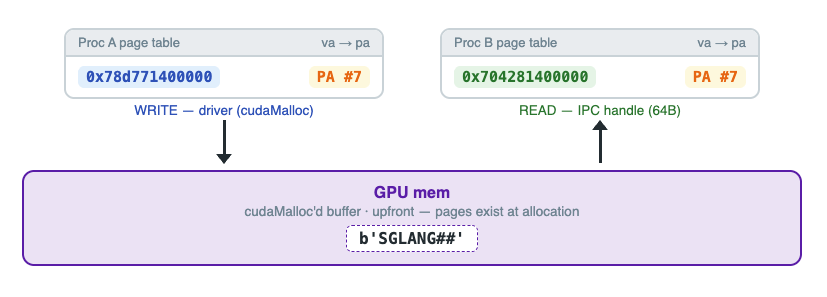
- IPC Handle: This plays the same role of shared namespace in the CPU example. cudaIpcGetMemHandle() takes in a cudamalloc pointer and registers it as shareable. It then returns a 64 byte ticket that can be used to access it from a different process. Internals of its functioning are opaque.
- Driver: This has a similar function to the row writer above. cudaIpcOpenMemHandle() takes in the 64 bytes IPC handle from the previous step and calls the driver. Driver then writes a new row in the current process’ page table, the same VA->PA mapping.
Let’s write a small piece of code to understand this better. First we will create a thin wrapper around libcudart.so (CUDA runtime library that contains cudaMalloc, cudaMemcpy etc..) so we can directly use it in our python code.
import ctypes
import multiprocessing as mp
import os

# ---- cudart bindings, same calls as sglang cuda_wrapper.py ----
class Ctx:
    def __init__(self):
        self.lib = ctypes.CDLL("libcudart.so")

    def check(self, rc):
        if rc != 0:
            raise RuntimeError(f"cudart error {rc}")

    def malloc(self, n):
        p = ctypes.c_void_p()
        self.check(self.lib.cudaMalloc(ctypes.byref(p), ctypes.c_size_t(n)))
        return p

    def memcpy_h2d(self, dst, data: bytes, offset=0):
        src = ctypes.create_string_buffer(data)
        self.check(self.lib.cudaMemcpy(
            ctypes.c_void_p(dst.value + offset), src,
            ctypes.c_size_t(len(data)), 1))                 # 1 = HostToDevice

    def memcpy_d2h(self, src, n, offset=0):
        buf = ctypes.create_string_buffer(n)
        self.check(self.lib.cudaMemcpy(
            buf, ctypes.c_void_p(src.value + offset),
            ctypes.c_size_t(n), 2))                         # 2 = DeviceToHost
        return buf.raw[:n]

    def get_handle(self, ptr):                              # MINT
        h = IpcHandle()
        self.check(self.lib.cudaIpcGetMemHandle(ctypes.byref(h), ptr))
        return ctypes.string_at(ctypes.addressof(h), 64)    # 64 opaque bytes

    def open_handle(self, ticket: bytes):                   # REDEEM
        self.lib.cudaIpcOpenMemHandle.argtypes = [
            ctypes.POINTER(ctypes.c_void_p), IpcHandle, ctypes.c_uint,
        ]
        p = ctypes.c_void_p()
        self.check(self.lib.cudaIpcOpenMemHandle(
            ctypes.byref(p), IpcHandle.from_buffer_copy(ticket),
            1))                                             # 1 = LazyEnablePeerAccess
        return p

    def close_handle(self, ptr):
        self.check(self.lib.cudaIpcCloseMemHandle(ptr))
We create a mirror of the IPCHandle ourselves as that is not accessible via ctypes and follow the same steps as we did on the CPU, write using the main process and read using the child process but through a different VA.
class IpcHandle(ctypes.Structure):
    _fields_ = [("reserved", ctypes.c_char * 64)]

def child(ticket: bytes):
    cuda = Ctx()
    ptr = cuda.open_handle(ticket)                          # driver plants the row
    print(f"[child  pid={os.getpid()}]  VA={hex(ptr.value)}  reads:  "
          f"{cuda.memcpy_d2h(ptr, 8)}")
    cuda.memcpy_h2d(ptr, b"THANKS!!", offset=8)             # write via own VA
    cuda.close_handle(ptr)

if __name__ == "__main__":
    mp.set_start_method("spawn")                            # CUDA + fork don't mix
    cuda = Ctx()
    ptr = cuda.malloc(4096)
    cuda.memcpy_h2d(ptr, b"SGLANG##")
    print(f"[parent pid={os.getpid()}]  VA={hex(ptr.value)}  writes: b'SGLANG##'")

    ticket = cuda.get_handle(ptr)                           # mint: 64B, no address
    print("ticket (first 16 of 64 bytes):", ticket[:16].hex())

    p = mp.Process(target=child, args=(ticket,))            # ship: pickled bytes
    p.start()
    p.join()                                                # no free before child closes

    print("[parent]  reads child's write through its own VA:",
          cuda.memcpy_d2h(ptr, 16)[8:16])
The output we get is
[parent pid=11502]  VA=0x78d771400000  writes: b'SGLANG##'
ticket (first 16 of 64 bytes): 2094fa0100000000ee2c000000000000
[child  pid=11507]  VA=0x704281400000  reads:  b'SGLANG##'
[parent]  reads child's write through its own VA: b'THANKS!!'
Not every allocation can be shared via this. IPC handle can’t be created for memory from cudaMallocAsync that is stream ordered. Since it is a dynamic allotment inside a fixed mem pool plus it only lives when its creation event fires inside that particular stream, there can be no fixed handle issued for it.
ctx = Ctx()                                            # same ctypes wrapper as before
stream = ctypes.c_void_p()
ctx.lib.cudaStreamCreate(ctypes.byref(stream))

# ── classic cudaMalloc: one driver-owned allocation → handle mints fine ──
p1 = ctx.malloc(1024)
print("cudaMalloc     →", ctx.get_handle(p1)[:8].hex())      # ✔ 2094fa01...

# ── stream-ordered cudaMallocAsync: anonymous slice of a pool → refused ──
p2 = ctypes.c_void_p()
ctx.check(ctx.lib.cudaMallocAsync(ctypes.byref(p2), 1024, stream))  # allocates fine!
try:
    ctx.get_handle(p2)                                 # the exact same mint call
except RuntimeError as e:
    print("cudaMallocAsync →", e)                       # ✖ cudart error ...
Output:
cudaMalloc     → 2094fa0100000000
cudaMallocAsync → cudart error 1 (cudaErrorInvalidValue)
Handle lifecycle
A thing to note is that unlike CPU, where a reference pins the memory i.e it can’t be freed till there are no references, CUDA IPC handle doesn’t work like that. There is NO refcounting and the underlying mem can be cleared anytime. Another point of difference is that CUDA IPC cannot open a handle in the same process, since the row for the local memory is already added in its page table, opening the IPC handle to it will throw an error.
In a way, it falls to devs to properly manage its lifecycle. One slightly problematic thing that happens in cross process comms is that, there can occur a case where the underlying mem of a shared handle gets cleared even before the consumer has time to open it. SGLang solves this with a simple approach, it simply keeps the tensor in a dict till its IPC handle is consumed by the rest.
Physical Transport: PCIe, NVLink and NVSwitch
Here I’ll just cover the different transports available, the finer details about the protocols involved will be covered in subsequent blogs. The pyramid below shows where each of them sits in the bandwidth hierarchy, which also includes on-chip mem and network transfers for better context.

PCIe
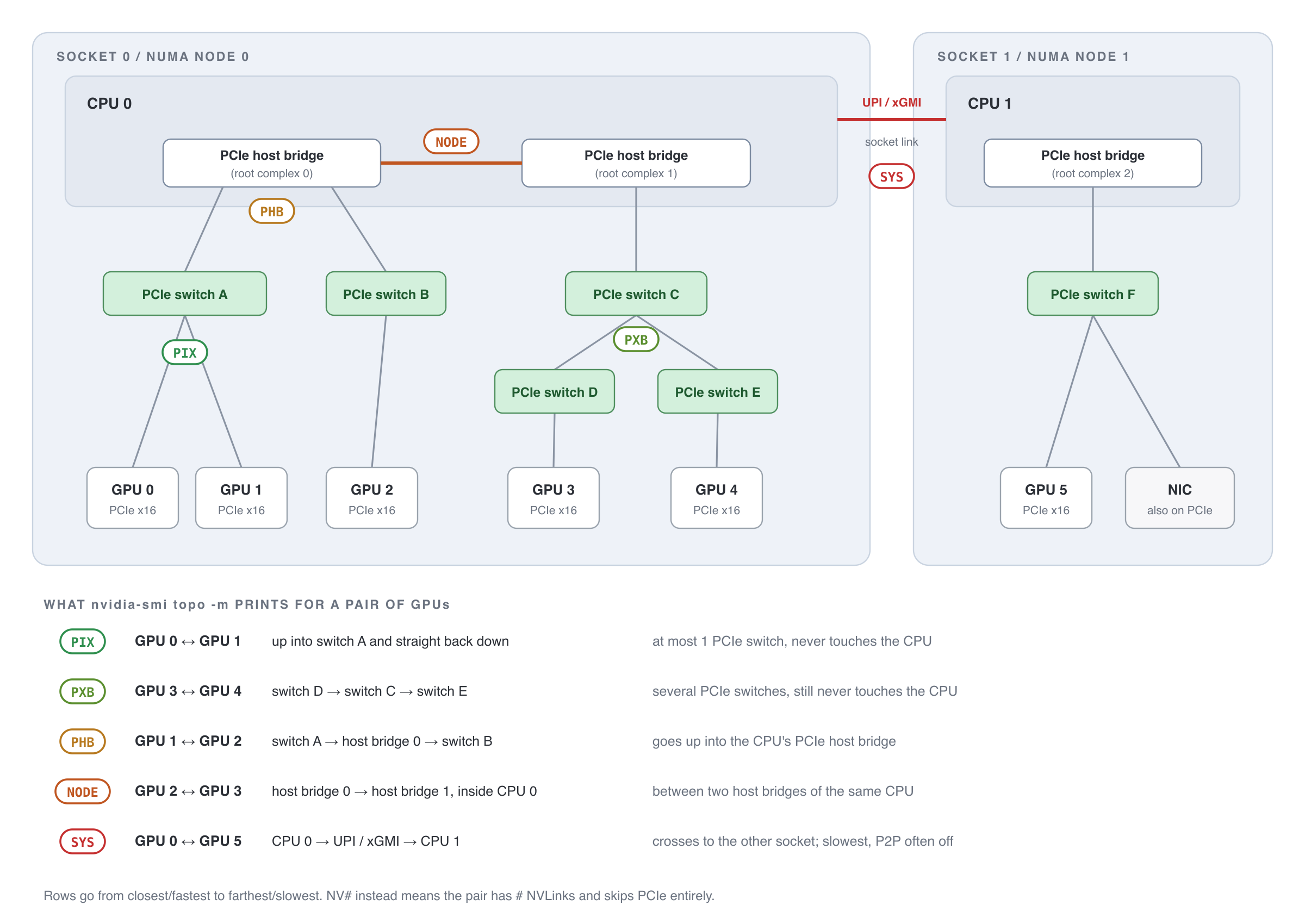
PCIe stands for Peripheral Component Interconnect Express, and as the name implies it’s a link between CPU and the peripherals: GPUs, NICs, SSDs etc. Lane here is defined as a set of physical wires providing full duplex comm. Links come in different lane configs, like x1, x4, x8 or x16. GPUs are generally connected to x16.
Connections are arranged as a tree. At the top there is the CPU’s PCIe controller with the PCIe switches fanning out links below it (since CPU has limited lanes). In the diagram you can see how the comm signal travels in the given tree. For a given system the topology table can be obtained using nvidia-smi.
- PIX: both GPUs sit under the same PCIe switch and the traffic turns around inside it.
- PXB: traffic crosses several PCIe switches but never reaches the CPU.
- PHB: traffic goes up into the CPU’s PCIe host bridge and back down.
- NODE: traffic crosses between two host bridges on the same CPU (same NUMA node).
- SYS: traffic crosses the socket link (UPI/xGMI) to the other CPU.
- NV#: the pair is connected by # NVLinks and skips PCIe entirely.
Here are different generations of PCIe and their speed.
| Gen (spec year) | x16, each direction | Example NVIDIA system |
|---|---|---|
| Gen1 (2003) | 4 GB/s | GeForce 8800 GTX |
| Gen2 (2007) | 8 GB/s | Tesla C2050 (Fermi) |
| Gen3 (2010) | 16 GB/s | DGX-1 (V100) |
| Gen4 (2017) | 32 GB/s | DGX A100 |
| Gen5 (2019) | 64 GB/s | DGX H100 |
| Gen6 (2022) | 128 GB/s | DGX B300 (Blackwell Ultra) |
| Gen7 (2025) | 256 GB/s | none yet |
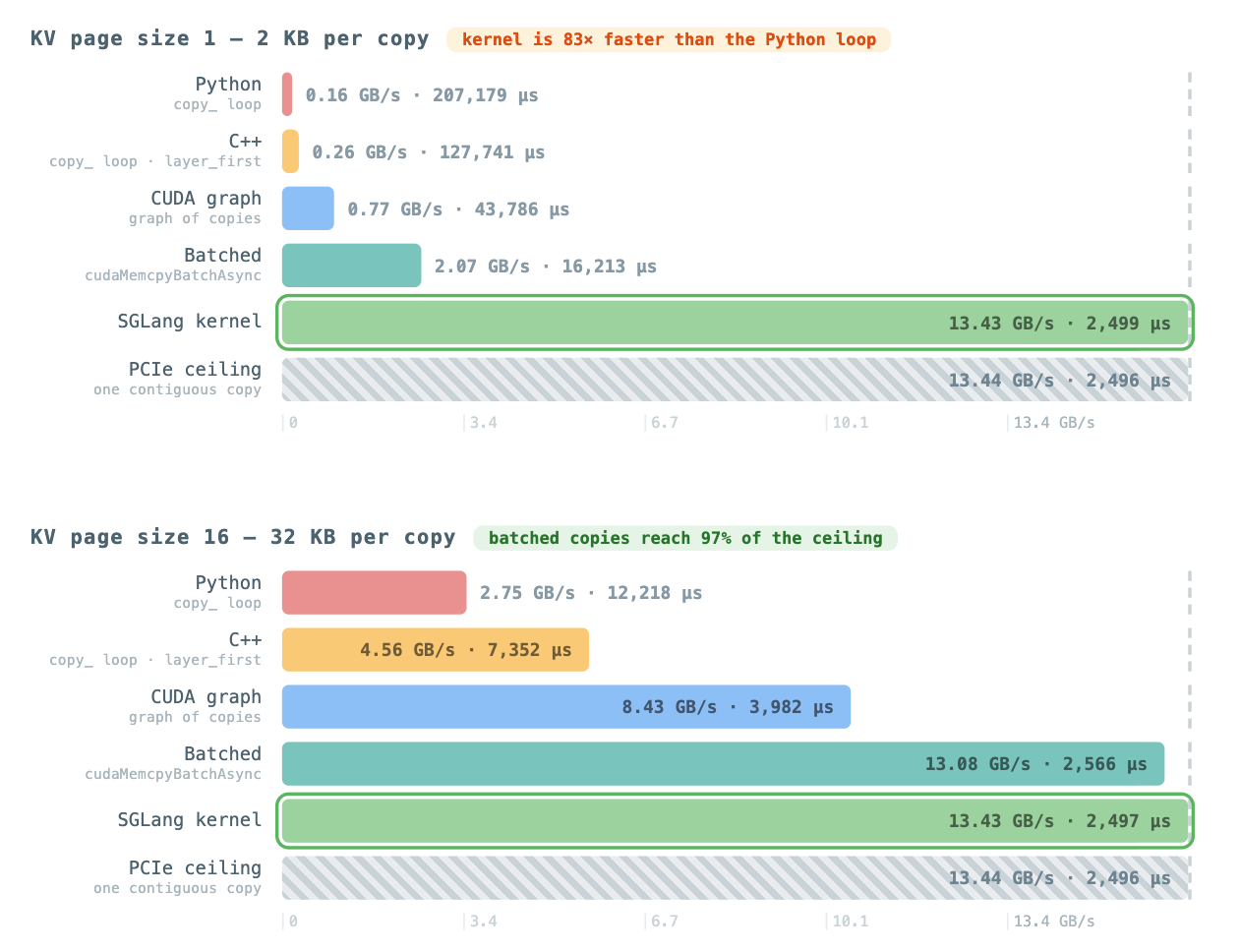
SGLang Usage - Saturating the PCIe link
While transferring data between host and device, the default way is to use the on-chip Copy Engine (CE). The issue is that queuing data becomes the first bottleneck, which is done by the CPU and the CE itself becomes the other bottleneck (albeit much smaller) as it processes the items sequentially. For a 2KB transfer CPU takes 5us queuing it while the CE takes about 0.4us to do the actual transfer. SGLang addresses both of these with different options. For handling the CPU side sequential queuing, it has a separate method that uses batch queuing (cudaMemcpyBatchAsync), while to remove both bottlenecks, it writes a small custom kernel where groups of threads (workers) load and store the data through SMs (no CEs involved). At smaller KV page sizes we can see a drastic difference in performance among the three - direct transfer, batch queuing and the transfer kernel, but at larger KV page sizes (not to be confused with OS pages) the difference becomes much smaller. This is mainly because the on-wire time is much greater than the per-copy setup cost that CE pays for. Some other things that SGLang does is, that it limits the number of blocks for these transfer kernels so they don’t take much SM compute, and in HiCache transfer in different directions happen on different streams, so both can overlap with the main process. While running a simple benchmark, I also added a separate CUDA graph copy variant that recorded the individual copy loops, so as to eliminate the CPU side queuing, but that ended up creating other overheads as the graph’s nodes launched (1.5-3us per node overhead).
NVLink
NVLink is a direct link between two GPUs, it works similar to PCIe but has a much higher bandwidth. This also allows for direct de referencing without actually moving the data like with Ethernet/InfiniBand/RDMA (more on this in the next blog). So, a GPU thread can do load, store ops on an address that lives in a different GPU’s memory. Lanes here are uni directional, unlike PCIe. Links are full duplex and a GPU can have many links, 18 on H100 and B200.
| NVLink | GPU | Lanes per link × rate (each way) | Per link, each way | Links per GPU | Per GPU (bidirectional) |
|---|---|---|---|---|---|
| 1 | P100 (2016) | 8 × 20 Gb/s | 20 GB/s | 4 | 160 GB/s |
| 2 | V100 (2017) | 8 × 25 Gb/s | 25 GB/s | 6 | 300 GB/s |
| 3 | A100 (2020) | 4 × 50 Gb/s | 25 GB/s | 12 | 600 GB/s |
| 4 | H100/H200 (2022) | 2 × 100 Gb/s | 25 GB/s | 18 | 900 GB/s |
| 5 | B200/GB200 (2024) | 2 × 200 Gb/s | 50 GB/s | 18 | 1.8 TB/s |
(Per GPU = per link, each way × 2 directions × links per GPU.)
Here’s a simple code demonstrating direct access, we just have to enable peer access for the GPU reading the mem.
__global__ void read_peer(const float* peer, float* out, int n) {
    int i = blockIdx.x * blockDim.x + threadIdx.x;
    if (i < n) out[i] = peer[i] * 2.0f;      // plain load; the address is on GPU 1
}

int main() {
    int n = 1 << 20;
    float *on_gpu1, *on_gpu0;

    cudaSetDevice(1);
    cudaMalloc(&on_gpu1, n * sizeof(float));     // physical memory on GPU 1

    cudaSetDevice(0);
    cudaMalloc(&on_gpu0, n * sizeof(float));
    cudaDeviceEnablePeerAccess(1, 0);            // writes GPU 0's page-table rows for GPU 1's memory

    read_peer<<<n / 256, 256>>>(on_gpu1, on_gpu0, n);   // runs on GPU 0, loads cross NVLink
    cudaDeviceSynchronize();
}
SGLang Usage - Custom All-reduce
A 60 layer model runs approx 120 all-reduce ops per generated token. During decode the payload is small, roughly batch × hidden × 2B = 8KB at bs=1 (typically tens of KB) and around 2MB even at bs=256. In NCCL ring for small messages, the total times are about 10-20μs, which dwarfs the 1μs of actual wire time these transfers need (0.1μs for 64 KB and 5μs for 2 MB). Thus we end up paying 10x extra transfer cost. To solve this, SGLang ships its own kernel for small messages. At startup, each GPU creates a fixed buffer and swaps raw memory pointers with peers over NVLink. At call time each GPU publishes its data, signals all the other GPUs, and waits for their signal. At the end each GPU sums everything locally. Compared to the NCCL ring that requires 2(N-1) hops, every GPU forwarding its partial result, this only requires one hop and close to pure wire transfer times.
NVSwitch
Direct NVLink is limited by the number of links on the GPU. Even while working within the limits, more GPUs mean fewer links per pair. NVSwitch solves this by putting the switches in the middle and every GPU connects all its NVLinks directly to the switches. With NVSwitch, GPUs have direct links to each other just like direct NVLink (going over the switch) and can be scaled much better. Table below shows this wiring across generations.
| NVSwitch chip | GPU | Per-GPU bandwidth | Switch chips × links per GPU | System |
|---|---|---|---|---|
| 1st gen (2018) | V100 (Volta) | 300 GB/s | 12 chips (6 per board), 1 link to each of its board’s 6 | DGX-2 / HGX-2 (16 GPUs) |
| 2nd gen (2020) | A100 (Ampere) | 600 GB/s | 6 chips, 2 links to each (12 total) | HGX/DGX A100 (8 GPUs) |
| 3rd gen (2022), NVLink 4 Switch | H100/H200 (Hopper) | 900 GB/s | 4 chips, 5/4/4/5 links (18 total) | HGX/DGX H100 (8 GPUs) |
| 4th gen (2024), NVLink 5 Switch | B200 (Blackwell) | 1.8 TB/s | 2 chips, 9 links to each (18 total) | HGX B200 (8 GPUs) |
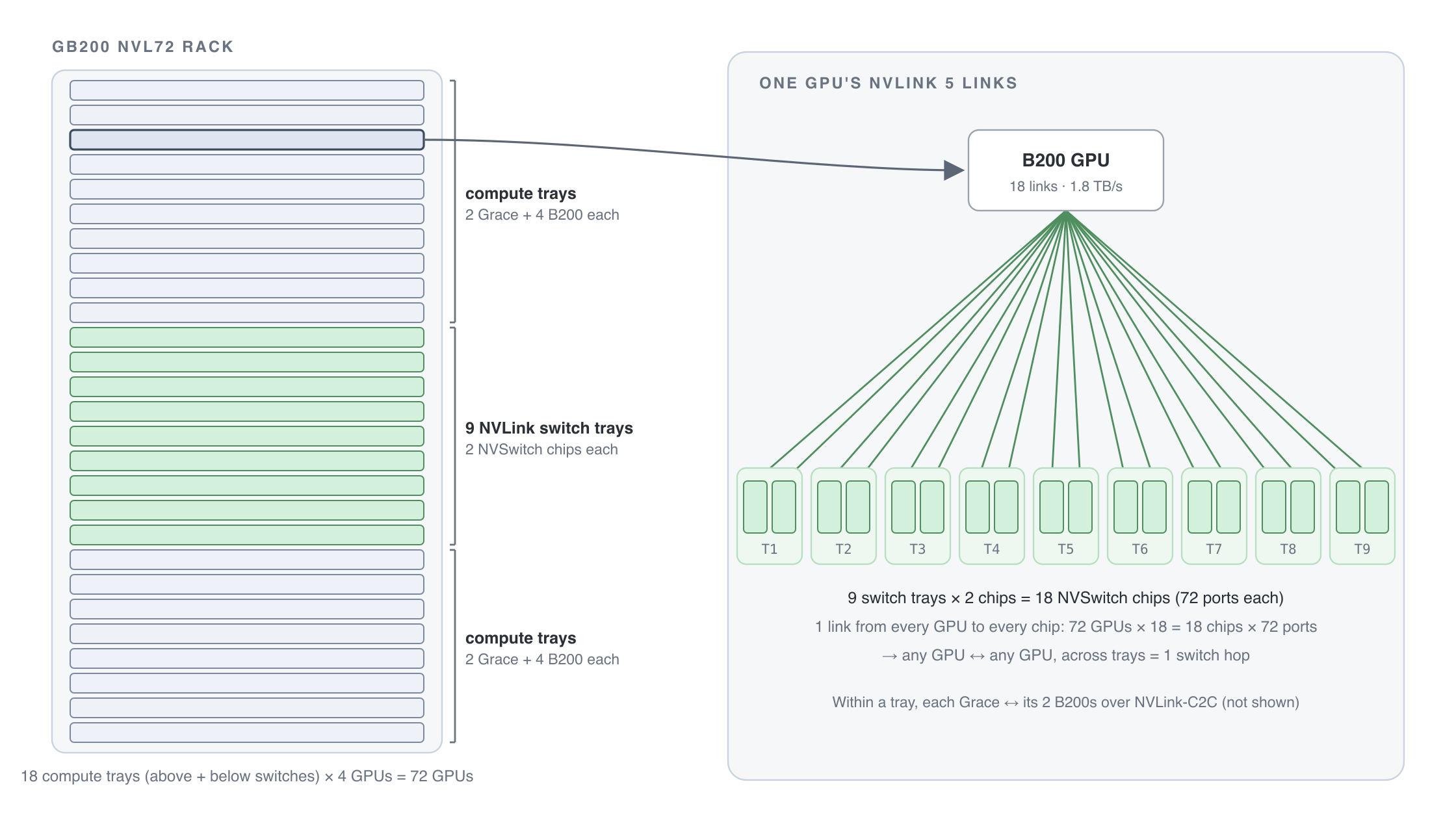
| 4th gen (2024), NVLink 5 Switch | GB200/GB300 (Grace + Blackwell) | 1.8 TB/s | 18 chips in 9 trays, 1 link to each (18 total) | NVL72 racks (72 GPUs) |
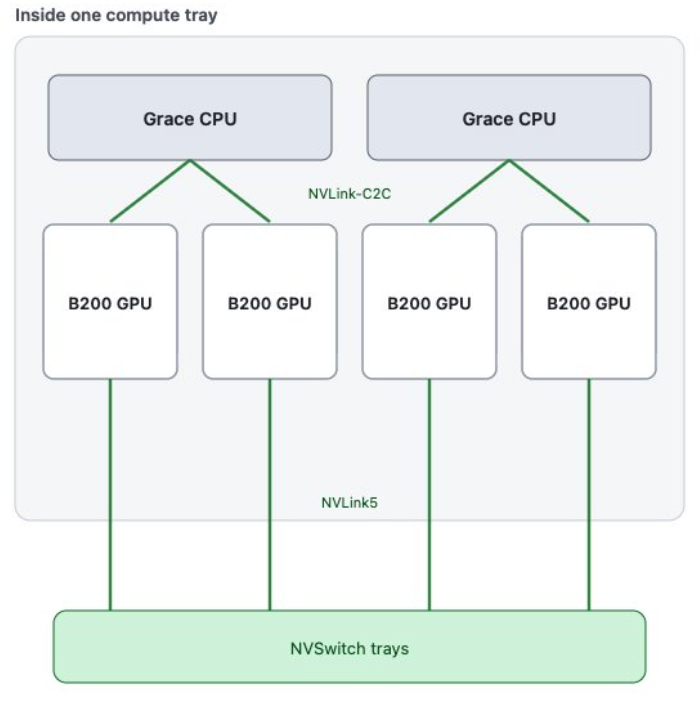
In NVL72 like systems switches live in their own trays, spread across 18 trays. Every GPU connects to every one of these, so the 72 GPUs cluster behaves as a one big box.
SGLang Usage - Custom All-reduce V2
SGLang has a v2 of the custom all-reduce kernel that is not restricted to a single node. V2 can work via the NVLink mesh if it is fully connected. Full NVLink means that every GPU can reach every other GPU over NVLink (NVSwitch hops count in this). SGLang detects this through NVML by getting nvmlDeviceGetP2PStatus(gpu_i, gpu_j, NVLINK) for all the pairs.
This check, however, is a little problematic on NVL72-style racks where nvswitch trays extend the NVLink across node boundaries. NVML can’t detect this for all the processes as it queries the local driver. Every GPU that joins the fabric gets a cliqueId (can be thought of as a group). Clique essentially maintains partitions among the fabric for e.g. in a cloud environment the vendor can make available different parts of it, as GPUs in two different cliques can’t talk to each other (even though they may be connected to the same fabric). SGLang simply checks this for every process individually, and all gathers clique IDs to match them.
But for running the kernel through the fabric, there is another requirement. Over the fabric switches, the CUDA driver creates and shares fabric handle. This is of VMM (Virtual Memory Management) handle type that works with paged memory, unlike the default CUDA malloc. To test if the current system supports it or not, SGLang simply allocates the byte and checks if it is paged VMM memory or not. So finally, if either it is a full nvlink mesh or fully connected fabric with VMM enabled, SGLang can safely proceed to run the kernel.
SGLang Usage - SHARP & Multicast
While working with custom all-reduce over the NVLink fabric, instead of doing a one-shot push manually, we have an alternate option to use the SHARP engine built into the NVSwitch. SHARP stands for Scalable Hierarchical Aggregation and Reduction Protocol and is available on 3rd gen and newer NVSwitches (H100, H200, B200..). SGLang uses this in its kernel through multimem.ld_reduce / multimem.st PTX instructions, NVSwitch fetches every rank’s copy and adds them in flight, making this work as a single op. In cases of NVL72-style systems where there are multiple switches involved, SHARP abstracts away the complexity and we use the same multicast instructions. One of the requirements for the SHARP engine to work is that there should be symmetric memory allocation on all the ranks; the same offsets should mean the same element.
Although multicast abstracts away the all-reduce, it’s not a silver bullet. According to the SGLang config, it’s used for 8 MB - 128 MB tensor sizes (per rank). For sizes less than 0.5 MB, SGLang simply uses the one-shot kernel, my guess is that for small sizes the overhead of barrier sync and copies outweighs just directly sending them over in one shot, and for sizes bigger than 128 MB it starts to congest the NVswitches. For sizes of 0.5 MB - 8 MB interestingly, SGLang uses the same kernel but without multicast, so it does N loads and stores. Here I am guessing there is again some overhead involved with SHARP that becomes the limiting factor at small sizes. The animation above is a simplification, in the real kernel, every rank reduces a slice of the tensors and then does an all-gather.
Closing Thoughts
Here we briefly covered the core concepts including the basic physical transports and how all of it is being used in SGLang. In the next blog I’ll cover more related topics, including some only touched on in here like VMM, specific transfer protocols, NCCL and RDMA.